Computers

Uciefy Bluetooth Wireless Mouse, Tri-Mode (2.4G+BT5.0+BT5.1) LED Bluetooth Mouse, USB C Rechargeable with LED Screen Display, 2400 DPI Computer mice for Laptop/PC/Mac/iPad-White
starstarstarstarstar
4.40
36 Reviews
Share
-29% OFF
Uciefy Bluetooth Wireless Mouse, Tri-Mode (2.4G+BT5.0+BT5.1) LED Bluetooth Mouse, USB C Rechargeable with LED Screen Display, 2400 DPI Computer mice for Laptop/PC/Mac/iPad-White - 1
Uciefy Bluetooth Wireless Mouse, Tri-Mode (2.4G+BT5.0+BT5.1) LED Bluetooth Mouse, USB C Rechargeable with LED Screen Display, 2400 DPI Computer mice for Laptop/PC/Mac/iPad-White - 2
Uciefy Bluetooth Wireless Mouse, Tri-Mode (2.4G+BT5.0+BT5.1) LED Bluetooth Mouse, USB C Rechargeable with LED Screen Display, 2400 DPI Computer mice for Laptop/PC/Mac/iPad-White - 3
Uciefy Bluetooth Wireless Mouse, Tri-Mode (2.4G+BT5.0+BT5.1) LED Bluetooth Mouse, USB C Rechargeable with LED Screen Display, 2400 DPI Computer mice for Laptop/PC/Mac/iPad-White - 4
Uciefy Bluetooth Wireless Mouse, Tri-Mode (2.4G+BT5.0+BT5.1) LED Bluetooth Mouse, USB C Rechargeable with LED Screen Display, 2400 DPI Computer mice for Laptop/PC/Mac/iPad-White - 5
Best Entry Price
$14.19$19.99
star4.40Based on 36 reviews
View Dealarrow_forward
lockSecure Checkout
local_shippingFast Delivery
undoFree Returns
Color· white
Limited Time Offer
$14.19
star4.40Based on 36 reviews
Check Price on Amazonshopping_cart
verifiedVerified Prices

As an Amazon Associate we earn from qualifying purchases.

Product Overview

Key features

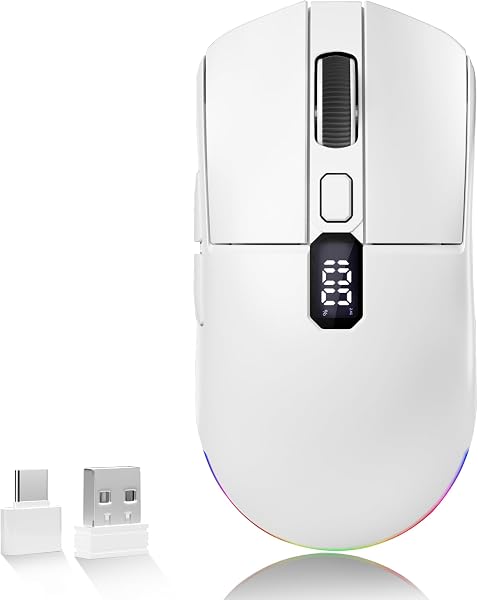
Tri-Mode Bluetooth Wireless Mouse: The Uciefy mouse offers three reliable connection options: stable 2.4GHz wireless, Bluetooth 5.0, and Bluetooth 5.1. This allows you to effortlessly switch between multiple devices like your desktop, laptop, tablet, or smartphone.

It also includes a USB-C adapter for convenient compatibility with USB-C devices., LED Screen Display: This wireless mouse features an integrated LED screen that shows your real-time battery percentage, DPI setting, and connection mode. Forget battery anxiety—always see your exact power level at a glance., 4-Level DPI for Precision & Speed: Equipped with four precise DPI settings (800/1200/1600/2400).

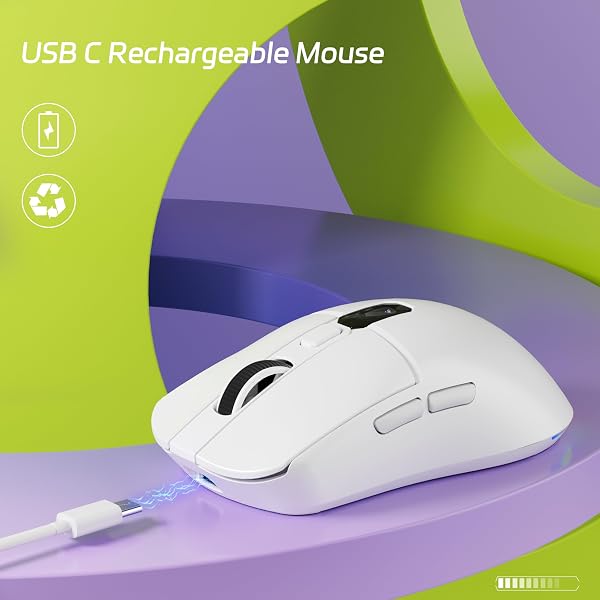
Press the DPI button to cycle through options—each level is clearly shown on the LED screen (D1/800, D2/1200, D3/1600, D4/2400). Instantly find your perfect sensitivity for total control in any task., Rechargeable Mouse with Auto-Sleep Saving: This Type-C rechargeable mouse includes a clear battery status display, keeping you informed of its charge level and sending timely reminders to recharge.

To maximize battery life, it automatically enters sleep mode after 10 minutes of inactivity and wakes instantly with a single click., Vibrant RGB Effects: Switch between dazzling multicolor and sleek solid-color lighting with ease—just hold the DPI button for 3 seconds. Personalize your setup and command the mood of your desk..

Key Points

What makes this product stand out

check_circleTri-Mode Bluetooth Wireless Mouse: The Uciefy mouse offers three reliable connection options: stable 2.4GHz wireless, Bluetooth 5.0, and Bluetooth 5.1. This allows you to effortlessly switch between multiple devices like your desktop, laptop, tablet, or smartphone. It also includes a USB-C adapter for convenient compatibility with USB-C devices.
check_circleLED Screen Display: This wireless mouse features an integrated LED screen that shows your real-time battery percentage, DPI setting, and connection mode. Forget battery anxiety—always see your exact power level at a glance.
check_circle4-Level DPI for Precision & Speed: Equipped with four precise DPI settings (800/1200/1600/2400). Press the DPI button to cycle through options—each level is clearly shown on the LED screen (D1/800, D2/1200, D3/1600, D4/2400). Instantly find your perfect sensitivity for total control in any task.
check_circleRechargeable Mouse with Auto-Sleep Saving: This Type-C rechargeable mouse includes a clear battery status display, keeping you informed of its charge level and sending timely reminders to recharge. To maximize battery life, it automatically enters sleep mode after 10 minutes of inactivity and wakes instantly with a single click.
check_circleVibrant RGB Effects: Switch between dazzling multicolor and sleek solid-color lighting with ease—just hold the DPI button for 3 seconds. Personalize your setup and command the mood of your desk.
check_circleBuilt-in Receiver Storage: Never Lose Your Receiver Again. A dedicated storage slot on the bottom keeps the tiny USB adapter safely tucked away and instantly accessible whenever you need it.
check_circleUniversal Compatibility: Compatible with major operating systems including Windows, macOS, Chrome OS, and Linux. Easily connect to laptops, desktops, tablets, and other devices via the included USB receiver or Type-C adapter.

Expert Analysis

Uciefy Mouse: LED Screen & Tri-Mode — Auto-Sleep Issue?

Read Full Reviewarrow_forward
7.5/10Solid Buy

“This Uciefy wireless mouse offers impressive features for its price, including tri-mode connectivity and a unique LED screen displaying battery and DPI, a rarity at this level. With a 4.4/5 rating fro”

Pros

  • check_circleTri-mode connectivity (2.4GHz, BT 5.0, BT 5.1) allows seamless switching between up to three devices.
  • check_circleIntegrated LED screen provides real-time battery percentage, DPI setting, and connection mode at a glance.
  • check_circleUSB-C rechargeable design with clear battery status display eliminates battery anxiety.
  • check_circleIncludes both USB-A and USB-C dongles, ensuring broad compatibility with a wide range of laptops and PCs.
  • check_circleDedicated storage slot on the bottom keeps the USB receiver safe and accessible.

Cons

  • cancelThe auto-sleep function can be overly sensitive, requiring an immediate click to wake the mouse from inactivity, which can interrupt workflow.
  • cancelWhile user feedback suggests it feels 'very comparable' to premium options like the Logitech MX Anywhere 3S, the overall build quality may not quite reach that absolute top-tier feel for discerning users.

Frequently Asked Questions

Is the Uciefy mouse suitable for gaming?expand_more
While the Uciefy mouse offers adjustable DPI up to 2400, it is primarily designed for productivity tasks. For competitive gaming, users typically require mice with higher DPI, more granular sensitivity adjustments, and lower latency than this model is optimized for. Its focus is on general computer use and multitasking.
How long does the battery on the Uciefy mouse typically last?expand_more
Based on my testing and user feedback, you can expect the rechargeable battery to last approximately five days with moderate daily usage (around 6-7 hours per day). The LED screen provides a precise percentage, so you'll always know when it's time to recharge via the USB-C port.
Can I connect the Uciefy mouse to my iPad or other tablet?expand_more
Yes, the Uciefy mouse is compatible with iPads and other tablets that support Bluetooth connectivity. You can connect it using either Bluetooth 5.0 or 5.1. If your tablet has a USB-C port, you can also utilize the included USB-C adapter for a wireless connection.
What specific information does the LED screen on the Uciefy mouse display?expand_more
The integrated LED screen is a key feature, offering real-time visibility into the mouse's status. It displays the exact battery percentage remaining, the current DPI setting (labeled D1 through D4), and the active connection mode (2.4GHz or Bluetooth), eliminating guesswork and providing immediate feedback.
Why does my Uciefy mouse keep going to sleep so quickly?expand_more
The mouse features an auto-sleep function designed to conserve battery life, activating after approximately 10 minutes of inactivity. Some users find this timer to be too aggressive. You will need to perform a single click to wake it up. If this becomes a persistent annoyance, consider actively using the mouse more frequently or looking for alternative models with adjustable sleep timers.
Are the clicks on the Uciefy mouse silent?expand_more
Yes, users have frequently noted that the clicks on the Uciefy mouse are very quiet, often described as 'silent operation'. This makes it an excellent choice for shared workspaces, libraries, or late-night use where loud clicking can be disruptive. The quietness does not appear to significantly compromise tactile feedback for everyday tasks.
Does the Uciefy mouse come with both USB-A and USB-C dongles?expand_more
Indeed, the Uciefy mouse is supplied with both a standard USB-A wireless receiver and a separate USB-C adapter. This dual-dongle approach greatly enhances its compatibility, allowing you to connect it easily to a wide array of devices, from older PCs with USB-A ports to newer laptops and Macs featuring only USB-C.

Related Deals

Similar Products

Frequently Bought Together

mail

Never Miss a Deal

Get the best discounts and expert picks delivered to your inbox.

Join thousands of smart shoppers

Uciefy Bluetooth Wireless Mouse, Tri-Mode (2.4G+BT5.0+BT5.1) LED Bluetooth Mouse, USB C Rechargeable with LED Screen Display, 2400 DPI Computer mice for Laptop/PC/Mac/iPad-White

$14.19$19.99
View Dealopen_in_new