Lenovo ThinkPad Hybrid USB-C with USB-A Dock US (40AF0135US)


As an Amazon Associate we earn from qualifying purchases.
Product Overview
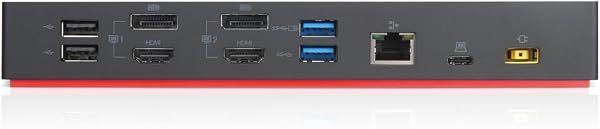
The ThinkPad Hybrid USB-C with USB-A dock expands the capabilities of most any laptop, new or old, making it perfect for enterprise customers with mixed-PC or shared-desk environments. Featuring enterprise-class manageability, like PXE boot and MAC address pass-through, the ThinkPad Hybrid USB-C with USB-A docking station offers three high-speed USB 3.1 ports and includes a USB-C to USB-A adapter to provide port replication to non-Lenovo or USB-C laptop computers.
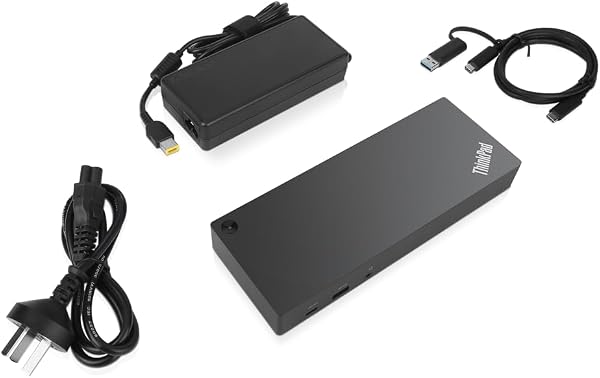
This ThinkPad Hybrid dock also supports dual monitor setups, up to dual UHD 4K resolution, and rapid charging for ThinkPad notebooks. What's in the Box: ThinkPad Hybrid USB-C with USB-A Dock; USB-C to USB-A adapter cable; 135W AC Adapter; Setup poster; Warranty poster.
Compatibility: E580, E480, E470, L580, L480, L470, L380, L380 Yoga, Lenovo Tablet 10, Miix 520-12IKB, T580, T570, T480, T480s, T470, T470s, T460, ThinkPad 25, X1 Carbon Gen 6, X1 Carbon Gen 5, X1 Yoga Gen 3, X1 Yoga Gen 2, X1 Tablet Gen 3, X1 Tablet Gen 2, 13 Gen 3 Windows, X280, X270, X260. Maximum Temperature = 35 Degrees Celsius / 95 Degrees Fahrenheit and Minimum Temperature = 0 Degrees Celsius / 32 Degrees Fahrenheit.
Key Points
What makes this product stand out
Main Specifications
Technical details and specifications
Expert Analysis
Lenovo ThinkPad Hybrid USB-C Dock: Deal Alert - Honest Review
“This Lenovo ThinkPad Hybrid USB-C Dock is a versatile option, especially for those needing both USB-C and USB-A connectivity, but it's not a simple plug-and-play solution for everyone. With a solid 4.”
Pros
- check_circleVersatile hybrid connectivity: The inclusion of a USB-C cable with an integrated USB-A dongle means this dock works with both modern USB-C laptops and older machines lacking that port, broadening its usability significantly.
- check_circleExtensive display support: With two DisplayPort and two HDMI outputs, users can drive multiple high-resolution monitors simultaneously, enhancing productivity for content creators and multitaskers.
- check_circleHigh-speed data transfer: Three USB 3.1 Gen 2 ports offer 10Gbps speeds, which is crucial for quickly transferring large files to/from external SSDs or running high-bandwidth peripherals.
- check_circleDedicated mobile charging: The dock provides 15W charging via its USB-C port and 10.5W from an always-on USB-A port, allowing you to power up phones or tablets without needing a separate charger.
- check_circleGenerous warranty: A 3-year limited warranty provides peace of mind, suggesting Lenovo's confidence in the long-term durability of this hardware.
Cons
- cancelSetup complexity reported by professionals: Despite its plug-and-play potential, I found user reports, including one from an 'experienced IT pro,' stating it's not a simple plug-in-and-go device, implying potential driver or configuration hurdles.
- cancelLaptop charging not supported by dock's 15W spec: The 15W listed is for charging external mobile devices, not for powering or charging the host laptop itself, which is a common expectation for docking stations of this type.
Frequently Asked Questions
Can I charge my laptop with this Lenovo ThinkPad Hybrid USB-C Dock?expand_more
What is the difference between the USB-C and USB-A connection on this dock?expand_more
How many monitors can I connect to this docking station?expand_more
Is this Lenovo dock compatible with non-Lenovo laptops?expand_more
What does the 'always-on USB charging' port do?expand_more
What are the benefits of the USB 3.1 Gen 2 ports?expand_more
Related Deals
Similar Products
Frequently Bought Together
Never Miss a Deal
Get the best discounts and expert picks delivered to your inbox.
Join thousands of smart shoppers