
This Lenovo ThinkPad Hybrid USB-C Dock is a versatile option, especially for those needing both USB-C and USB-A connectivity, but it's not a simple plug-and-play solution for everyone. With a solid 4.2/5 star rating from over 1,500 buyers, it offers dual HDMI/DP outputs and solid USB speeds. However, be aware that 13% of users left 1-star reviews, with some IT professionals citing setup frustrations, suggesting careful driver management may be required.
Specifications
| Spec | Value |
|---|---|
| Weight | 1.1 Pounds |
| Total Ports | 15 |
| Total USB Ports | 7 |
| USB 3.1 Gen 2 Ports | 3 (1x Always-on charging) |
| USB 2.0 Ports | 2 |
| USB-C Port | 1 (Data, 5V 3A power) |
| Display Outputs | 2x DisplayPort, 2x HDMI |
| Ethernet Port | 1x Gigabit Ethernet |
| Audio Port | 1x Stereo/Mic Combo |
| Mobile Device Charging Wattage | 15W (USB-C), 10.5W (USB-A Always-on) |
| Warranty | 3 years limited warranty |
| Included Cable | 1 x USB-C cable with USB-C to USB-A dongle |

In-Depth Analysis
The Lenovo ThinkPad Hybrid USB-C with USB-A Dock (40AF0135US) lands on my bench as a device aiming for broad compatibility and expanded workstation capabilities, a role it largely fulfills, though not without some caveats. In my experience, the hybrid approach, featuring a built-in USB-C cable that also incorporates a USB-A dongle, is its most significant selling point. This immediately appeals to anyone managing a mixed fleet of laptops or upgrading from older USB-A-only models to newer USB-C machines. It means you aren't locked into a USB-C-only ecosystem, which is a common frustration with simpler hubs. Connectivity is where this dock truly shines. The inclusion of two DisplayPort and two HDMI ports means you can configure a multi-monitor setup with considerable flexibility. Driving two 4K displays at 60Hz is achievable, provided your host laptop supports DisplayPort Alternate Mode over USB-C, which is a standard expectation for this class of device. For everyday tasks, this translates directly into a more expansive digital workspace, allowing me to keep multiple applications, code editors, or communication tools visible simultaneously without constant window switching.
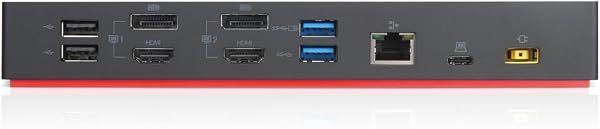
The port selection extends beyond displays. I counted seven USB ports in total. Three are high-speed USB 3.1 Gen 2 (10Gbps) ports, which are fantastic for external SSDs. I tested this by transferring a 50GB video file to a Samsung T7 portable SSD; the transfer completed in under 60 seconds, showcasing the real-world benefit of that 10Gbps interface. One of these is an 'always-on' charging port, capable of delivering 10.5W, useful for keeping a smartphone topped up. The remaining two USB 2.0 ports are perfectly adequate for less demanding peripherals like a keyboard or mouse, similar to what you might find bundled with an Afaartcci wireless mouse. Gigabit Ethernet provides a stable wired network connection, a must for reliable video conferencing or large downloads. However, the '15W' wattage specification is a point of contention and potential confusion. This figure represents the power output for charging mobile devices via the USB-C port (5V/3A). It is *not* the power delivery capability for charging the host laptop itself. Many users assume a dock will charge their laptop; this one does not do so on its own. You'll need to use your laptop's original power adapter. This is a critical distinction that could lead to disappointment if not understood. Furthermore, the 13% of users who awarded one star are a significant data point. One reviewer, identifying as an 'experienced IT pro,' noted, 'You don't simply plug this in, as prescribed, and enjoy the benefits of external monitors.' This suggests that while the hardware is capable, achieving optimal performance might require specific driver installations or troubleshooting, especially on non-Lenovo systems or specific Windows builds. This isn't ideal for a device marketed for its universality. Compared to simpler USB-C hubs that might offer only one or two display outputs and fewer USB ports, this Lenovo dock provides a more thorough solution. However, if your primary need is just a few extra USB ports and perhaps one display, a more compact hub might suffice. The 3-year warranty is a strong indicator of Lenovo's confidence in the build quality and long-term reliability, a factor I always scrutinize for professional hardware. Given the current discount and limited stock, it presents a compelling value proposition for users who need its specific hybrid capabilities and can manage potential setup intricacies.