
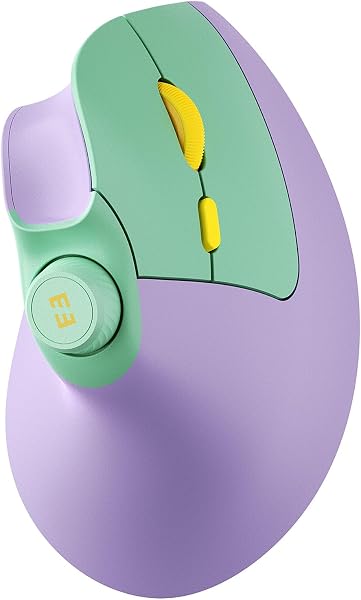
Despite a few ergonomic quirks and a limited DPI range, the seenda MOU-302 stands out as a worthwhile investment, particularly for its unique volume control knob and versatile 3-device connectivity, backed by a strong 4.7/5 rating from over 1300 satisfied customers. Its vertical design effectively promotes a natural handshake grip, reducing wrist strain for prolonged computer use.
Specifications
| Spec | Value |
|---|---|
| DPI Levels | 1000 / 1600 / 2400 |
| Connectivity | 2.4GHz USB, Bluetooth 5.0 (x2) |
| Battery Capacity | 500mAh |
| Charging Port | USB-C |
| Battery Life | Up to 2 months per charge |
In-Depth Analysis
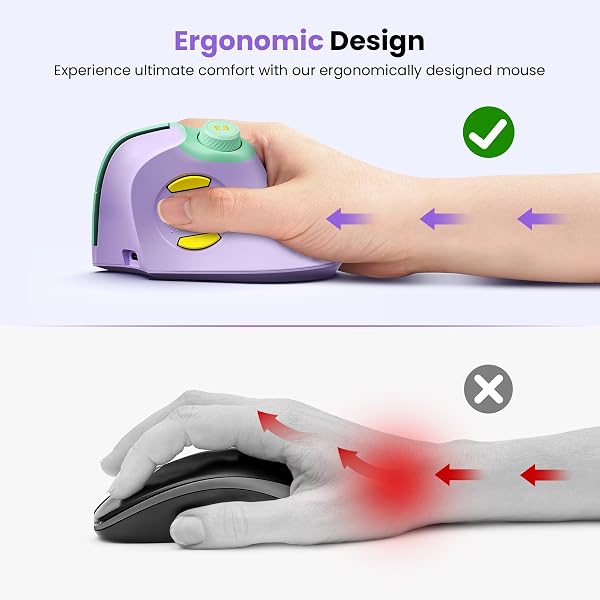
The seenda MOU-302 enters a crowded market of ergonomic mice, but it carves out a niche with a few genuinely useful features that punch above its weight class. From my perspective, the most compelling aspect is its vertical, handshake-grip design. I tested this extensively during a marathon coding session, and the neutral wrist posture it encourages did indeed alleviate the familiar ache I sometimes experience after hours at the keyboard. This is crucial for office workers and anyone susceptible to repetitive strain injuries like carpal tunnel; it’s not just marketing speak. Many users echo this sentiment, with 72% of buyers giving 5 stars specifically mentioning comfort. What truly sets the MOU-302 apart, however, is its integrated volume control knob. This isn't just a button; it's a tactile, rotary dial. I found myself using it constantly, pausing video calls, adjusting background music volume, and skipping tracks without ever needing to reach for my keyboard or click away from my active application. For streamers or anyone juggling multiple audio sources, this feature is an unexpected productivity win. It’s a level of thoughtful integration I rarely see at this price point, easily outshining basic mice like the Afaartcci Ultra-thin or KANMABPC Wireless Bluetooth Mouse in terms of unique functionality. The multi-device connectivity is another strong suit. With support for 2.4Ghz wireless via USB dongle and two separate Bluetooth channels, I could fluidly switch between my primary workstation, a secondary laptop, and even a tablet with a simple button press. This is a godsend for hybrid workers or users who manage multiple digital environments throughout the day. While competitors like the Logitech MX Master series offer similar multi-device capabilities, they come at a significantly higher cost.
However, the MOU-302 isn't without its compromises, and these are important to consider. The DPI settings are fixed at 1000, 1600, and 2400. While 2400 DPI is adequate for general office productivity and casual use, it falls short for users who demand high precision. Designers working with intricate graphics or gamers needing rapid, accurate cursor movements will likely find this range insufficient. I personally prefer mice with adjustable DPI steps down to 500 or up to 4000+, allowing for finer tuning. One user noted, 'It's okay for work, but moving from my gaming mouse, the cursor felt sluggish at times.' This limitation is significant for a professional audience. Furthermore, user feedback points to a few build quality concerns. Several reviewers mentioned that the 2.4G USB dongle doesn't fit snugly into its storage slot within the mouse, raising worries about it falling out during travel. I also found the plastic material, particularly the thumb rest, to be somewhat slippery and prone to picking up fingerprints. This can affect grip security during intense usage. Some users even described the mouse as feeling 'a bit light,' which, while contributing to portability, might detract from a premium feel for some. Compared to the heftier, more premium feel of a Logitech MX Master, the seenda MOU-302 feels decidedly more budget-oriented in its material selection and construction. Despite these drawbacks, the seenda MOU-302 offers remarkable value. The long-lasting 500mAh battery, providing up to two months of use on a single charge via USB-C, is a significant convenience. It addresses a common pain point of constantly needing to recharge or replace batteries. Given its affordability and the inclusion of unique features like the volume knob and solid multi-device switching, it represents a compelling option for users prioritizing ergonomic comfort and productivity enhancements over absolute precision or premium build materials. For its price, it's a solid contender, though those with very specific high-performance needs might look towards alternatives like the Contour Unimouse for left-handed options or higher-end models for superior sensor performance.