Electronics

Universal-TV-Remote-Control Compatible with Samsung/LG/Vizio/Hisense/Sony/Philips/Onn/Sharp/RCA/Element/Westinghouse/Sanyo/Em

starstarstarstarstar
4.50
60282 Reviews
Share
Best Entry Price
$9.98
star4.50Based on 60282 reviews
View Dealarrow_forward
lockSecure Checkout
local_shippingFast Delivery
undoFree Returns
Limited Time Offer
$9.98
star4.50Based on 60282 reviews
Check Price on Amazonshopping_cart
verifiedVerified Prices

As an Amazon Associate we earn from qualifying purchases.

Product Overview

Key features

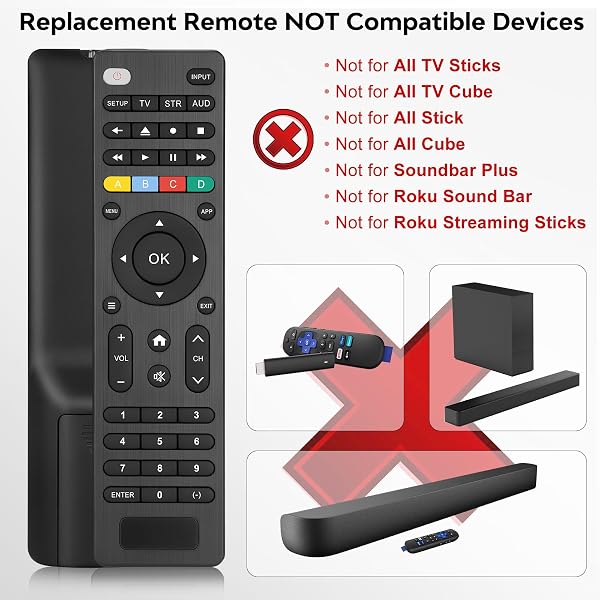
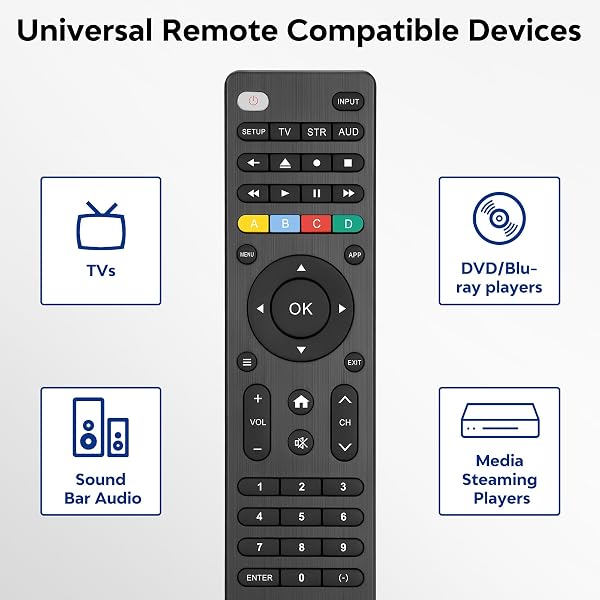
【Compatible Devices】Universal replacement remote control is compatible with TV brands for Samsung, LG, Vizio, Sony, Hisense, Onn, Sharp, RCA, Element, Westinghouse, Sanyo, Emerson, Philips, JVC, Sceptre, Sansui, Panasonic, Magnavox, Skyworth TV and More Brand Smart TVs. Compatible with of devices, including DVD/Blu-ray players, Media Streaming Players and more!, 【NOT Compatible Devices】Universal remote is Not compatible with Roku Streaming Sticks, Roku Sound Bar, TLC Sound Bar, Hisense Sound Bar, Anker Sound Bar, Klipsch Sound Bar, All Fire TV, All TV Sticks, All TV Cube, Apple TV, Google Chromecast TV(This product can only be connected and paired via infrared) If you are unsure if our remote control is compatible with your device, please contact us., 【Simple Setup】Step 1: Find the device type you need in the code list.

Then find and circle all the codes for the brand. Step 2: Press and hold down the (SETUP) button for 3 seconds until the red light on the remote turns on.

Step 3: Press and release the (TV/STR/AUD) button on the remote, the red light will blink once and remain on. Step 4: Enter the first 4-digit code from code list.

Step 5: Point the remote at the TV, and test the buttons on the remote to see if the TV responds as you would expect. If the buttons don't control the TV, repeat steps 2-4 and enter different code to test.

Note:If all the code in the program fails, please check the instructions on page 7 "Automatic Code Search., 【Package Included】Package includes 1* Remote Control, 1* User Manual, and 1* Code list. The universal remote control is to use 2 * AAA alkaline batteries(Batteries are not included).

Note: Please do not mix old and new batteries or mix different batteries together., 【After-Sales Service】We attach great importance to the customer's experience of using remote controls. If you have any questions about your order or product, please contact us and we will get back to you within 24 hours on working days..

Built with Item Weight: 58 Grams, Item Dimensions L x W x H: 6.69"L x 3.06"W x 0.71"H, Color: Black.

Key Points

What makes this product stand out

check_circle【Compatible Devices】Universal replacement remote control is compatible with TV brands for Samsung, LG, Vizio, Sony, Hisense, Onn, Sharp, RCA, Element, Westinghouse, Sanyo, Emerson, Philips, JVC, Sceptre, Sansui, Panasonic, Magnavox, Skyworth TV and More Brand Smart TVs. Compatible with of devices, including DVD/Blu-ray players, Media Streaming Players and more!
check_circle【NOT Compatible Devices】Universal remote is Not compatible with Roku Streaming Sticks, Roku Sound Bar, TLC Sound Bar, Hisense Sound Bar, Anker Sound Bar, Klipsch Sound Bar, All Fire TV, All TV Sticks, All TV Cube, Apple TV, Google Chromecast TV(This product can only be connected and paired via infrared) If you are unsure if our remote control is compatible with your device, please contact us.
check_circle【Simple Setup】Step 1: Find the device type you need in the code list. Then find and circle all the codes for the brand. Step 2: Press and hold down the (SETUP) button for 3 seconds until the red light on the remote turns on. Step 3: Press and release the (TV/STR/AUD) button on the remote, the red light will blink once and remain on. Step 4: Enter the first 4-digit code from code list. Step 5: Point the remote at the TV, and test the buttons on the remote to see if the TV responds as you would expect. If the buttons don't control the TV, repeat steps 2-4 and enter different code to test. Note:If all the code in the program fails, please check the instructions on page 7 "Automatic Code Search.
check_circle【Package Included】Package includes 1* Remote Control, 1* User Manual, and 1* Code list. The universal remote control is to use 2 * AAA alkaline batteries(Batteries are not included). Note: Please do not mix old and new batteries or mix different batteries together.
check_circle【After-Sales Service】We attach great importance to the customer's experience of using remote controls. If you have any questions about your order or product, please contact us and we will get back to you within 24 hours on working days.

Main Specifications

Technical details and specifications

ASINB0D6GFNFJY
BrandAcoyer
ColorBlack
Model NameUniversal Remote
Item Weight58 Grams
Battery TypeAlkaline
ManufacturerAcoyer
Model NumberSRP9232D
Maximum Range30 Feet
Button Quantity49
Controller TypeButton Control
Mfr Part NumberSRP9232D
Special FeatureUniversal
Customer Reviews4.5 4.5 out of 5 stars (60,081) 4.5 out of 5 stars
Best Sellers Rank#14 in Electronics (See Top 100 in Electronics) #1 in Remote Controls (Electronics)
Compatible DevicesDVD/Blu-ray Player, Television
Additional FeaturesUniversal
Number of Batteries2 AAA batteries required.
Warranty Description1-Year Warranty
Connectivity TechnologyInfrared
Item Dimensions L x W x H6.69"L x 3.06"W x 0.71"H
Compatible Television ModelsHisense 55H8F, Sony XBR-65X900F, Vizio V505-G9
Max Number of Supported Devices3
Maximum Number of Supported Devices3

Expert Analysis

Acoyer Universal Remote: Budget Control vs. Setup Issues? | Tested

Read Full Reviewarrow_forward
7/10Good Value with Caveats

“This Acoyer Universal Remote offers a budget-friendly solution for basic TV control, but its infrared-only operation and limited device support present significant drawbacks. While 80% of buyers award”

Pros

  • check_circleOffers wide compatibility with dozens of mainstream TV brands like Samsung, LG, Vizio, and Sony, plus DVD/Blu-ray players.
  • check_circleExtremely budget-friendly, making it an attractive option for users seeking a low-cost replacement or secondary remote.
  • check_circleSimple button layout and basic functionality are easy to grasp for straightforward operations once programmed.

Cons

  • cancelLimited to controlling a maximum of three devices, which is restrictive for modern, multi-component home entertainment setups.
  • cancelOperates solely via infrared (IR), rendering it incompatible with popular streaming devices such as Roku Streaming Sticks, Fire TV Sticks, and Apple TV, as well as many newer soundbars.
  • cancelSetup can be a point of frustration, requiring users to consult code lists and potentially cycle through multiple codes to achieve functionality, as indicated by user feedback.

Frequently Asked Questions

Is this Acoyer remote compatible with my Roku Streaming Stick or Fire TV Stick?expand_more
No, this Acoyer Universal Remote operates exclusively via infrared (IR) signals. This means it requires a direct line of sight to your devices and cannot communicate with popular streaming devices like Roku Streaming Sticks, Fire TV Sticks, or Apple TV, which typically use Bluetooth or Wi-Fi for control.
How do I program the Acoyer Universal Remote if the initial codes don't work?expand_more
If the initial codes fail, the remote offers an 'Automatic Code Search' function detailed on page 7 of the manual. You'll typically press and hold the SETUP button, then press the device button (e.g., TV), and then press the power button repeatedly while the remote cycles through codes until your device turns off. Once it turns off, you press a button like TV or OK to lock the code.
Can the Acoyer Universal Remote control more than three devices?expand_more
No, the Acoyer Universal Remote is explicitly designed to control a maximum of three devices. This limitation is a key consideration if you have a complex home entertainment setup involving a TV, soundbar, Blu-ray player, game console, and multiple streaming boxes. You may need to choose which devices to manage with this remote.
Does this remote come with batteries, and what type does it use?expand_more
The Acoyer Universal Remote does not include batteries in the package. It requires two AAA alkaline batteries to operate. It's important not to mix old and new batteries or different battery types, as this can affect performance and potentially damage the device over time.
What TV brands are compatible with the Acoyer Universal Remote?expand_more
This remote boasts compatibility with a wide array of TV brands, including Samsung, LG, Vizio, Sony, Hisense, Onn, Sharp, RCA, Element, Westinghouse, Sanyo, Emerson, and Philips, among many others. It also supports devices like DVD and Blu-ray players, provided they are controllable via infrared signals.

Related Deals

Similar Products

Frequently Bought Together

mail

Never Miss a Deal

Get the best discounts and expert picks delivered to your inbox.

Join thousands of smart shoppers

Universal-TV-Remote-Control Compatible with Samsung/LG/Vizio/Hisense/Sony/Philips/Onn/Sharp/RCA/Element/Westinghouse/Sanyo/Em
$9.98
View Dealopen_in_new