Laptop Screen Extender, 15.6'' 1080P FHD Laptop Monitor Extender with 235°Rotation Detachable Dual Monitor, Plug & Play, Triple Screen for 13"-17.3" Laptops Compatible with Mac/Wins/Android/Dex



As an Amazon Associate we earn from qualifying purchases.
Product Overview
Key features
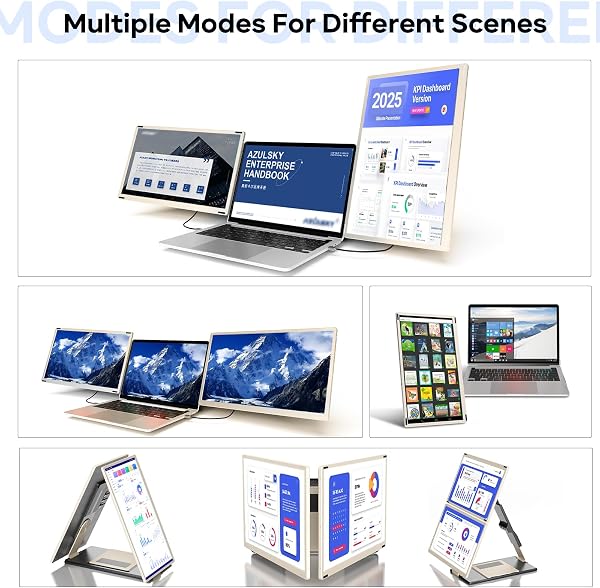
【Versatile and Customizable Stand】The newly upgraded stand has a flexible design that supports 235° horizontal rotation and 90° vertical rotation, and can be customised for landscape, portrait, and stacked folding screen configurations. It also features a detachable option that allows the single-sided laptop screen extender to be used independently when travelling (only 2.1 lbs per side).
For all your daily work, leisure and entertainment needs Whether you're collaborating with colleagues or presenting to clients, it's easy to view from any angle., 【1080P IPS FHD quality】The triple portable monitor laptop uses 15.6-inch FHD 1080P IPS screen, providing you higher image quality, brighter screen and more vivid colors. With the built in speakers, you can enjoy a better viewing experience.
At the same time, the low-blue light design portable display has anti-glare and flicker-free functions, which provides eye protection, 【Improve your Work Efficiency By 300% 】The triple monitor laptop has a deformable function. This can significantly increase your productivity by up to 300%, you can open 3 pages at the same time and debug them in real time.
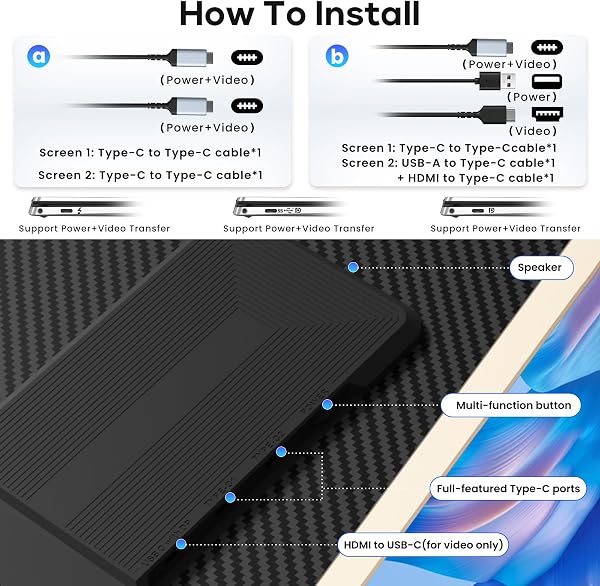
Advanced mode allows you to perform multiple tasks at the same time. You can also program, create spreadsheets, and finance at the same time, greatly increasing your productivity.Not only that, when you are giving presentations or playing games, you can disassemble it into two 15.6-inch single screens and share them with friends or colleagues, which greatly improves the fun experience, 【Plug and Play, No Driver Required】This is a triple laptop screen extender for 13"-17.3" laptops, whether you choose a USB-C, USB-A or HDMI connection, simply plug in the laptop screen extender and start your daily use without drivers. (Please note: When using the HDMI cable, connect an additional USB-A to USB-C cable on the same screen extender for power supply), 【Broad compatibility】Our new monitor extender supports a variety of devices and operating systems, and this triple screen laptop monitor extender is compatible with Windows, Mac (M1 Pro/ Max, M2 Pro/ Max, M3 Pro/ Max,Does not support M1/M2/M3 chip), Chrome, Android, Linux, Dex other devices, please read the instructions carefully before use.
If you have any questions, feel free to contact us and we will get back to you within 24 hours.
Key Points
What makes this product stand out
Expert Analysis
Redalf Laptop Screen Extender: Versatile Display or Cable Nightmare?
“This Redalf laptop screen extender is a solid buy, offering significant productivity gains with its versatile dual-screen setup, backed by an 886-review average rating of 4.3/5. While it boasts plug-a”
Pros
- check_circleThe newly upgraded stand offers exceptional versatility with 235° horizontal and 90° vertical rotation, allowing for landscape, portrait, and stacked configurations, plus it detaches for independent travel use.
- check_circleFeatures a 15.6-inch FHD 1080P IPS screen that provides higher image quality, brighter visuals, and vivid colors, incorporating anti-glare and flicker-free functions for enhanced eye protection.
- check_circleSetup is streamlined with true plug-and-play functionality, requiring no driver installations for immediate use across USB-C, USB-A, or HDMI connections.
- check_circleUser feedback frequently praises the build quality, citing metal frames and a durable construction that instills confidence in its longevity.
Cons
- cancelCable management can become challenging due to the necessity of multiple cables (USB-C for power and display) when a single-cable connection is not supported by certain laptops.
- cancelThe integrated speakers are widely considered to have poor sound quality, failing to deliver an immersive or satisfactory audio experience for media or calls.
- cancelOperating the On-Screen Display (OSD) settings using the single jog wheel is often described as difficult and cumbersome, leading to frustration when trying to fine-tune adjustments.
Frequently Asked Questions
Is the Redalf laptop screen extender truly portable for frequent travel?expand_more
How easy is it to set up the Redalf triple monitor system?expand_more
Can I use this Redalf monitor extender with my M1, M2, or M3 MacBook?expand_more
What is the actual productivity improvement users can expect?expand_more
Are the built-in speakers adequate for watching videos or taking calls?expand_more
How does this monitor extender compare to a standard external monitor?expand_more
Related Deals
Similar Products
Frequently Bought Together
Never Miss a Deal
Get the best discounts and expert picks delivered to your inbox.
Join thousands of smart shoppers