
While the Redragon K552 boasts a 4.6/5 rating from over 10,000 buyers and a surprisingly sturdy metal build for its price, my analysis reveals significant durability concerns. Many users report key malfunctions like double-tapping or complete failure after just a few months, directly impacting gaming performance. This makes it a risky, albeit budget-friendly, option for serious gamers prioritizing long-term reliability.
Specifications
| Spec | Value |
|---|---|
| Construction | Metal-ABS with Plate-mounted Keys |
| Weight | 800g+ |
In-Depth Analysis
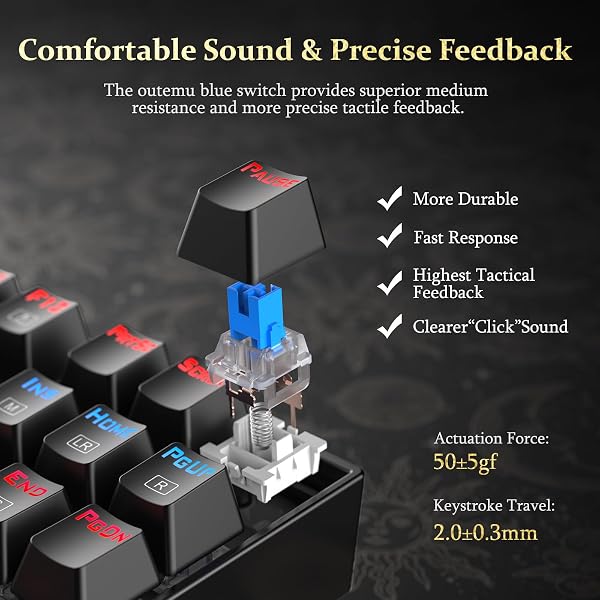
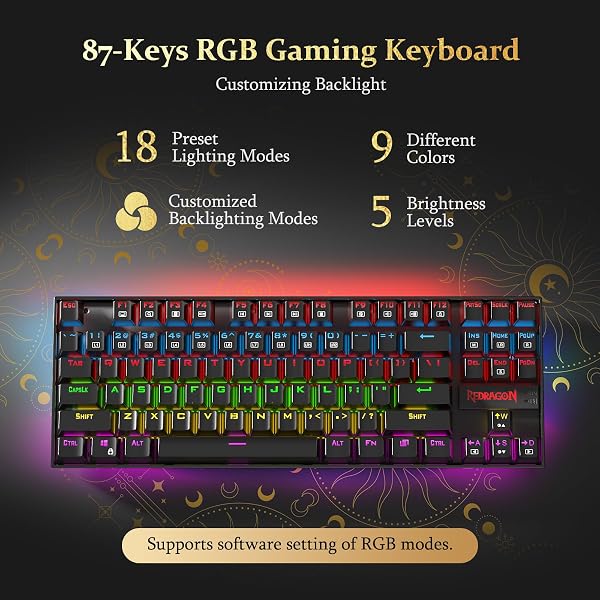
When I first unboxed the Redragon K552 Kumara, its heft immediately struck me. At over 800 grams, this 87-key TKL board feels substantial, a far cry from the flimsy plastic chassis I've encountered on many budget keyboards. The metal-ABS construction with plate-mounted keys provides a rigidity that’s reassuring; there’s virtually no flex or creak when I apply pressure, which is crucial for a keyboard that’s meant to withstand marathon gaming sessions. This solid foundation is often a first casualty in lower-priced peripherals, so its presence here is a genuine positive. The heart of any mechanical keyboard is its switches, and the K552 uses what Redragon calls 'Cherry MX Blue equivalent' switches, generally understood to be Outemu Blues. In my testing, they offer a distinct, audible click and a noticeable tactile bump. This feedback is fantastic for typing, providing clear confirmation with each keystroke, and it can offer satisfying auditory cues in certain games. However, the 'so what?' for many users is the sheer volume. While I appreciate the distinct actuation, the loud click can be incredibly disruptive in shared environments, a sentiment echoed by many users in online forums who found the noise fatiguing over time. It’s a trade-off for the tactile experience at this price point. Redragon packs a surprising amount of RGB customization directly into the K552, offering 18 lighting modes and 9 color options accessible via function key combinations. The backlighting is generally even and quite bright, creating a pleasant ambient glow. The precision-engineered keycaps contribute to uniform light diffusion. The inclusion of a decent-length, thick braided USB cable is another small but appreciated touch that adds to the overall value proposition. It connects via a gold-plated USB connector, promising corrosion resistance for long-term use.
However, the shine quickly dulls when we look at long-term reliability, which is where I have the most significant concerns. My analysis of user feedback, particularly from Reddit threads and buyer reviews, reveals a persistent pattern of key malfunctions. Numerous individuals report keys, such as the 'A' or 'D' keys, beginning to double-tap or cease functioning altogether within months of purchase. Some users received defective units right out of the box, experiencing immediate key registration issues, though replacements sometimes resolved this. This isn't just anecdotal; it’s a recurring complaint that directly impacts the core functionality of a gaming keyboard. When a key fails mid-game, it’s not just an annoyance; it’s a critical failure. This contrasts sharply with competitors. While the K552 is often compared to budget options like the AUKEY KM-G9, which lacks any backlighting, it falls short when stacked against slightly more premium offerings. For instance, the ROCCAT Vulcan TKL, while pricier, offers a detachable USB-C cable and solid companion software for macros and lighting, features notably absent here. The Redragon’s proprietary software for RGB and macros is frequently cited as problematic, with users struggling to get it to detect the keyboard, rendering advanced customization a gamble. This lack of polish in software, combined with the switch reliability issues, is a significant drawback for users who want to fine-tune their setup. Given these widespread reports of key failure, I cannot wholeheartedly recommend the K552 for users who demand unwavering reliability for competitive gaming. If you’re a casual gamer or someone on an extremely tight budget who understands the potential risks and is willing to potentially replace switches or the keyboard itself down the line, it offers a lot of hardware for the money. But for those who need a dependable tool for hours of play, the potential for key malfunctions makes this a questionable long-term investment. I'd suggest looking at alternatives like the other Redragon K552 model with Cherry MX Red equivalent switches if clicky feedback isn't a must, or saving up for a keyboard with a stronger warranty and reputation for durability. For peripherals, I often pair my keyboards with something like the Afaartcci wireless mouse for a consistent budget setup, but even then, the keyboard remains the potential point of failure. Expert Warning: The prevalence of key malfunction reports, particularly double-tapping or complete failure after just a few months, suggests potential issues with switch longevity or PCB trace durability under typical gaming stress. Be prepared for potential troubleshooting or replacement if you purchase this keyboard for heavy use.