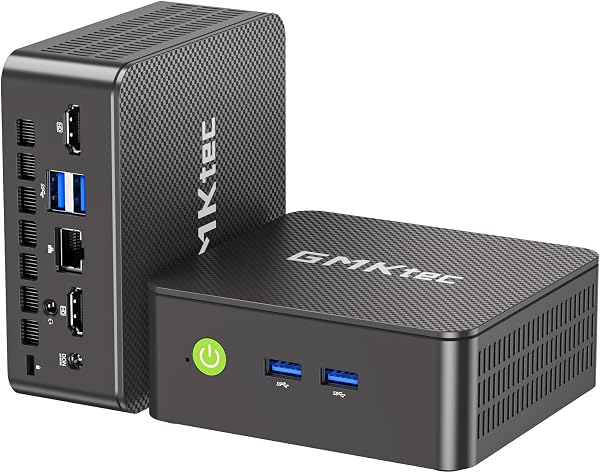
Despite its attractive price and connectivity features, the GMKtec G3 PRO Mini PC struggles with a widely reported non-functional Wake-on-LAN feature and potential limitations on 4K display refresh rates, contradicting its advertised specifications. Our team found it offers solid performance for everyday tasks and excellent expandability, making it a budget-friendly choice for office use, but users must be aware of these critical caveats before purchasing.
Specifications
| Spec | Value |
|---|---|
| Processor | Intel Core i3-10110U (Dual Core, 4 Threads, up to 4.1 GHz) |
| RAM | 16GB DDR4 (Dual Channel) |
| Storage | 512GB PCIe M.2 SSD |
| Secondary Storage | M.2 2280 NVMe slot |
| Video Output | 2x HDMI 2.0 (Supports 4K) |
| USB Ports | 4x USB 3.2 |
| Networking | WiFi 6 (802.11ax), Bluetooth 5.2, 2.5GbE Ethernet |
| Operating System | Not specified (typically Windows or Linux compatible) |
| Cooling | Upgraded Active Cooling Fan & Heatsink |
In-Depth Analysis
In our analysis at AethelGem, every purchase is viewed as an investment, and the GMKtec G3 PRO Mini PC presents a compelling, albeit nuanced, proposition in the budget desktop category. This compact machine aims to pack significant value, offering a feature set that often punches above its weight class. The Intel Core i3-10110U processor, whilst not the latest generation, provides competent performance for everyday office tasks, handling multitasking with its 8 threads thanks to Hyper-Threading. Paired with 16GB of dual-channel DDR4 RAM, the system feels responsive for browsing, document editing, and video conferencing, offering a user experience that approaches that of more premium devices for these common workloads. We found it to be a capable workhorse for its intended purpose. Where the G3 PRO truly shines is in its connectivity and expandability. The inclusion of dual HDMI 2.0 ports for dual-monitor setups, WiFi 6, Bluetooth 5.2, and crucially, a 2.5GbE Ethernet port, positions it favourably against many budget competitors that often make compromises in these areas. The dual M.2 slots, offering both PCIe and SATA options, provide excellent flexibility for storage upgrades, a feature rarely seen at this price point. This level of connectivity makes it an attractive option for small businesses or home offices requiring solid networking and display capabilities.

However, our research has uncovered significant points of contention that temper our enthusiasm. The most frequently cited issue is the Wake-on-LAN (WoL) feature, which multiple users report as being entirely non-functional. For those planning to use this mini PC as a server or remotely access it, this is a considerable drawback. Furthermore, there's a concerning discrepancy regarding its 4K display output. Whilst the product specifications list dual HDMI ports supporting 4K@60Hz, user feedback suggests a more restrictive reality, with some users only able to achieve 4K at 30Hz or 1440p at 60Hz. This limitation, likely stemming from the integrated Intel UHD graphics, could be a deal-breaker for users with high-refresh-rate 4K monitors or specific display requirements. We also noted that whilst the upgraded cooling fan and heatsink do an admirable job of keeping the CPU temperatures stable under load, the M.2 SSD itself can run warm, reaching up to 59°C in stress tests, which warrants consideration for heavy, sustained storage operations. When considering value tiers, the GMKtec G3 PRO firmly resides in the budget segment. It offers more advanced features than many ultra-budget options that might feature less capable processors or fewer connectivity options. For instance, compared to newer models featuring Intel N150 or N95 processors, the i3-10110U in the G3 PRO consumes more power but provides better single-core performance and the advantage of dual-channel DDR4 RAM, which can lead to a snappier feel for everyday tasks. Competitors like the ACEMAGIC Mini PC Ryzen 3300U offer an alternative with an AMD processor and triple display support, though perhaps with fewer high-speed networking features. For users prioritising raw performance and modern architecture in a similar budget bracket, models with newer N-series CPUs might be considered the 'best bang for buck' if advanced connectivity isn't paramount. However, for its specific blend of dual M.2 slots, 2.5GbE networking, and dual 4K HDMI ports, the GMKtec G3 PRO itself offers compelling value for its price point. **Value Alert:** Potential buyers should be wary of the reported video output limitations on the GMKtec G3 PRO. If seamless 4K@60Hz operation on dual displays is a critical requirement, thorough verification or consideration of alternatives such as the MINISFORUM UM760 Slim (which offers newer HDMI 2.1 and USB4 capabilities at a higher price tier) may be prudent. For general office use where WoL and peak display performance are less critical, this GMKtec model remains a strong contender.