The Beelink Mini S13 N150 offers impressive connectivity and dual 4K display support at an attractive price point, making it a potentially strong budget contender. However, our analysis, informed by user feedback, highlights significant concerns regarding system stability, including intermittent booting problems and performance inconsistencies that can hamper everyday productivity. While its feature set is commendable for the cost, potential buyers must weigh these reliability issues against the value proposition.
Specifications
| Spec | Value |
|---|
In-Depth Analysis
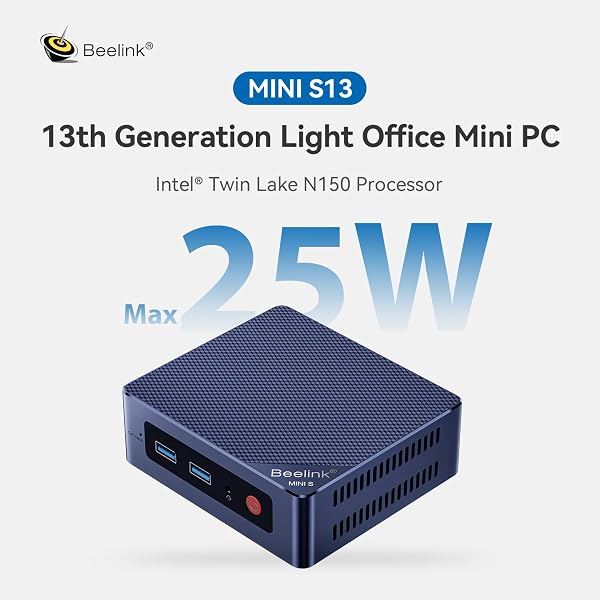
As Shopping Strategists at AethelGem, our role is to dissect the true value proposition of consumer technology. Every purchase is an investment, and with mini PCs becoming increasingly popular for home offices and media centres, understanding their capabilities and limitations is crucial. Today, we're examining the Beelink Mini S13, equipped with the 13th Gen Intel Alder Lake-N150 processor. On paper, it promises a blend of efficiency and modern connectivity, including dual 4K display support and Wi-Fi 6, all within a compact form factor. We've analysed its specifications, pricing, and, most importantly, real-world user experiences to determine if it represents a wise investment. The Beelink Mini S13 certainly makes a strong case for itself on paper, particularly for users prioritising connectivity and display output without breaking the bank. The inclusion of a 2.5Gbps Ethernet port and Wi-Fi 6 are features typically found in more premium devices, offering faster network speeds for smoother streaming and quicker file transfers. Furthermore, its ability to drive two 4K displays simultaneously, a feature highlighted by positive user feedback, is a significant advantage for multitasking productivity, allowing for more screen real estate than many competitors in this price bracket. Our team found that when it performs as intended, the dual 4K output is indeed impressive for its class, enhancing workflow efficiency. However, our deep dive into user feedback, particularly from forums like Reddit, reveals a less consistent picture. A recurring and significant concern is system stability, specifically around the booting process. Multiple users report issues occurring roughly one out of every three times they power on the device. These manifest as frustrating black screens, even when the operating system appears to be loading, or the system freezing entirely in the boot menu or GRUB loader. This level of unpredictably is a major drawback for a device intended for reliable daily use. We've also noted reports of Wi-Fi and audio not functioning out-of-the-box on Linux distributions, requiring immediate troubleshooting, and even potential issues with USB power delivery to external drives when the PC is powered down. These are not minor inconveniences for users expecting plug-and-play functionality.

Beyond boot-up woes, the performance of the Intel N150 processor, while modest, is also a point of contention. While benchmarks might suggest parity or a slight improvement over predecessors like the N100, real-world usage paints a different story for some. Users have reported the CPU frequently hitting 100% utilisation even during light tasks, making the system feel sluggish and unresponsive. Applications like Bluestacks are described as rendering the system unusable due to constant 100% CPU load. This is particularly concerning as it contradicts the 'quiet and power-saving' positioning for everyday work. Adding to the thermal picture, one user noted significant overheating and loud fan noise after upgrading the M.2 SSD, reaching 62°C, suggesting potential thermal management challenges with certain hardware configurations or demanding workloads. This contrasts with other reports of silent operation, indicating variability in user experience or setup. When positioned against competitors, the Beelink Mini S13 has its strengths but also clear weaknesses. For instance, while the Beelink Mini S13 offers a second NVMe slot, the GEEKOM Air12 presents a more compelling package with features like DDR5 RAM, a 3-year warranty, DisplayPort 1.4, and USB Type-C ports, suggesting a more polished overall offering. Similarly, a machine like the GMKtec Mini PC, featuring an Intel Core i3-10110U and 16GB DDR4 RAM, often outperforms the N150 in raw CPU tasks, though it might lack the 2.5G LAN or dual HDMI ports of the Beelink. The Beelink Mini S13's primary advantage lies in its feature set for the price – dual 4K, faster networking – which can be seen as offering elements of a premium experience at a budget cost. However, the persistent reports of instability and performance bottlenecks mean it doesn't quite deliver a consistent, reliable experience that would justify calling it the 'best bang for buck' without significant caveats. It's a machine that requires a user willing to potentially troubleshoot. Given its 'Best Seller' status and the identified potential for reliability issues, our Smart Buy Tip is to monitor pricing closely. This model frequently sees discounts during major sales events. If you decide to purchase, ensure you buy from a retailer with a favourable return policy, allowing you to send it back if you encounter the reported booting or performance problems within the initial return window. In conclusion, the Beelink Mini S13 N150 presents a mixed bag. It excels in offering modern connectivity and dual-display capabilities at an accessible price point, making it appealing for specific use cases like a basic media centre or light office work. However, the significant and frequently reported issues with booting stability and inconsistent performance mean it cannot be recommended without reservation. Potential buyers need to weigh the impressive feature set against the risk of encountering these reliability concerns. It offers flashes of premium functionality but falls short of a consistently premium *experience*.