Computers & Accessories

Logitech MX Keys Mini Minimalist Wireless Illuminated Keyboard, Compact, Bluetooth, Backlit, USB-C, Compatible with Apple macOS, iOS, Windows, Linux, Android, Metal Build, QWERTY UK Layout - Graphite

starstarstarstarstar
4.50
0 Reviews
Share
-27% OFF
Logitech MX Keys Mini Minimalist Wireless Illuminated Keyboard, Compact, Bluetooth, Backlit, USB-C, Compatible with Apple macOS, iOS, Windows, Linux, Android, Metal Build, QWERTY UK Layout - Graphite - 1
Logitech MX Keys Mini Minimalist Wireless Illuminated Keyboard, Compact, Bluetooth, Backlit, USB-C, Compatible with Apple macOS, iOS, Windows, Linux, Android, Metal Build, QWERTY UK Layout - Graphite - 2
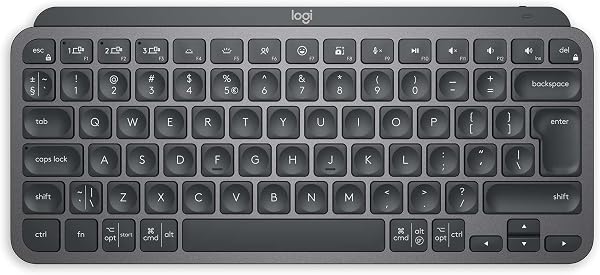
Logitech MX Keys Mini Minimalist Wireless Illuminated Keyboard, Compact, Bluetooth, Backlit, USB-C, Compatible with Apple macOS, iOS, Windows, Linux, Android, Metal Build, QWERTY UK Layout - Graphite - 3
Logitech MX Keys Mini Minimalist Wireless Illuminated Keyboard, Compact, Bluetooth, Backlit, USB-C, Compatible with Apple macOS, iOS, Windows, Linux, Android, Metal Build, QWERTY UK Layout - Graphite - 4
Logitech MX Keys Mini Minimalist Wireless Illuminated Keyboard, Compact, Bluetooth, Backlit, USB-C, Compatible with Apple macOS, iOS, Windows, Linux, Android, Metal Build, QWERTY UK Layout - Graphite - 5
Best Entry Price
£66.66£91.66
View Dealarrow_forward
lockSecure Checkout
local_shippingFast Delivery
undoFree Returns
Style Name· MX Keys Mini
checkMX Keys MiniMX KeysMx Keys Plus
Limited Time Offer
£66.66
Check Price on Amazonshopping_cart
verifiedVerified Prices

As an Amazon Associate we earn from qualifying purchases.

Product Overview

Key features

Perfect Stroke Typing with Smart Keys: Type on keys shaped for your fingertips, with voice to text Dictation, Mic Mute/Unmute(1) and Emoji keys.10 meters wireless range, Mini Size, Mighty Powerful: A layout designed for effortless precision, with a minimalist form for an ergonomic keyboard that's portable and can travel wherever you get work done, Smart Illumination: The external keyboard's backlit keys light up the moment your hands approach and automatically adjust to suit changing lighting conditions, Multi-Device, Multi OS: Pair MX Keys Mini compact keyboard with up to 3 devices on nearly any operating system via Bluetooth Low Energy and switch between them seamlessly, Multiple Computers, One Flow: Team the slim MX Keys Mini with MX Master 3 or MX Anywhere 3 and type across multiple computers or laptops in one fluid workflow(1). Built with Item Weight: ‎550 g, Lithium Battery Weight: ‎2 Kilograms, Product Dimensions: ‎29.59 x 13.19 x 2.09 cm; 550 g.

Key Points

What makes this product stand out

check_circlePerfect Stroke Typing with Smart Keys: Type on keys shaped for your fingertips, with voice to text Dictation, Mic Mute/Unmute(1) and Emoji keys.10 meters wireless range
check_circleMini Size, Mighty Powerful: A layout designed for effortless precision, with a minimalist form for an ergonomic keyboard that's portable and can travel wherever you get work done
check_circleSmart Illumination: The external keyboard's backlit keys light up the moment your hands approach and automatically adjust to suit changing lighting conditions
check_circleMulti-Device, Multi OS: Pair MX Keys Mini compact keyboard with up to 3 devices on nearly any operating system via Bluetooth Low Energy and switch between them seamlessly
check_circleMultiple Computers, One Flow: Team the slim MX Keys Mini with MX Master 3 or MX Anywhere 3 and type across multiple computers or laptops in one fluid workflow(1)
check_circlePair two of the world’s top creative tools: Claim your complimentary 1-month Adobe Creative Cloud subscription with purchase of MX Keys Mini to create, make and do like never before
check_circlePlastic parts in MX Keys Mini include certified post consumer recycled plastic (Graphite: 30 percent, Pale Gray and Rose 12 percent(5))
check_circleCertified carbon neutral: the carbon impact of MX Keys Mini has been reduced to zero

Main Specifications

Technical details and specifications

Brand‎Logitech
Colour‎Graphite
Series‎MX Keys Mini Keyboard
Batteries‎1 Lithium Polymer batteries required. (included)
Item Weight‎550 g
Manufacturer‎Logitech
Power Source‎Battery Powered
Operating System‎Android 5 or higher, iOS 13.14 or higher
Hardware Platform‎Chromebook, Laptop, PC
Item model number‎920-010495
Product Dimensions‎29.59 x 13.19 x 2.09 cm; 550 g
Number of Batteries‎1
Are Batteries Included‎Yes
Lithium Battery Weight‎2 Kilograms
Lithium Battery Packaging‎Batteries contained in equipment
Number Of Lithium Ion Cells‎1
Lithium Battery Energy Content‎4.18 Watt Hours
Guaranteed software updates until‎unknown

Expert Analysis

Logitech MX Keys Mini: Bloatware, Battery Drain & Longevity Concerns — Is the Premium Worth the Price?

Read Full Reviewarrow_forward
7.5/10Good Hardware, Flawed Software

The Logitech MX Keys Mini delivers a premium typing experience and strong multi-device support, making it a solid choice for productivity. Yet, its persistent backlight memory issues leading to batter

Pros

  • check_circleSolid metal build quality and exceptional typing feel, praised by users as 'one of the best typing experiences' for work, offering responsive feedback.
  • check_circleExcellent multi-device support, allowing quick switching between up to three devices (PC, Mac, mobile) via Bluetooth Low Energy, a key feature for multi-platform users.
  • check_circleCompact and highly portable design (29.59 x 13.19 x 2.09 cm, 550g), ideal for small desk setups or travel, fitting easily into laptop bags.
  • check_circleSmart backlighting that activates upon hand proximity and adjusts to ambient light, enhancing usability in varied lighting conditions.
  • check_circleLong battery life, especially when backlighting is manually managed, with reports of several months of use without charge.

Cons

  • cancelPersistent backlight memory issues and high battery drain: Users report the keyboard failing to remember backlight settings, forcing manual adjustment and significantly shortening battery life.
  • cancelReliance on Logi Options+ application, widely criticized as 'bloatware' with concerns over privacy (logging keystrokes), performance impact, and slowing system startup.
  • cancelIntermittent Bluetooth connection loss on Windows, requiring device switching to re-establish, which is particularly frustrating during fast-paced work or gaming sessions.
  • cancelNon-replaceable internal battery and inability to function in wired mode, raising significant longevity and e-waste concerns for a device at this price point.

Frequently Asked Questions

Does the Logitech MX Keys Mini work with multiple devices simultaneously?expand_more
Yes, the MX Keys Mini supports multi-device pairing via Bluetooth Low Energy, allowing you to connect and switch between up to three different devices like a PC, Mac, or mobile phone with a dedicated key press.
Can I customize the function keys on the MX Keys Mini?expand_more
While some basic functions can be remapped through the Logi Options+ software, users frequently report limitations and find some default keys (e.g., screenshot, emoji) redundant. Full, granular customisation is not as flexible as some competing keyboards, and the lack of onboard memory means settings are tied to the software.
How long does the battery last on the MX Keys Mini, especially with backlighting?expand_more
The MX Keys Mini's 4.18 Watt Hour Lithium Polymer battery can last for several months with the backlighting turned off. However, with the smart backlighting constantly active, especially due to its inability to remember settings, battery life significantly decreases, potentially requiring charging every few days or weeks.
Is the Logi Options+ software necessary for the MX Keys Mini?expand_more
The Logi Options+ software is required to access advanced features like custom key assignments, Smart Illumination adjustments, and Flow functionality. While the keyboard functions as a basic Bluetooth device without it, many of its premium features and customisation options are inaccessible, despite user complaints about the software being 'bloatware'.
Does the MX Keys Mini have adjustable feet for ergonomics?expand_more
No, the Logitech MX Keys Mini features a fixed, low-profile angle with no adjustable feet. This minimalist design prioritises portability and a flat typing surface, which some users find ergonomic, but it lacks the customisation options for tilt that many other keyboards offer.
Can the MX Keys Mini be used in wired mode?expand_more
Despite having a USB-C port, the MX Keys Mini cannot be used in a wired mode for data transmission. The USB-C port is solely for charging the internal battery, meaning the keyboard always requires a Bluetooth connection to function, even when plugged in.
Is the Logi Bolt USB receiver included with the MX Keys Mini?expand_more
No, the Logi Bolt USB receiver is not included with the MX Keys Mini and must be purchased separately. While the keyboard works via Bluetooth Low Energy, the Logi Bolt receiver offers a potentially more stable and secure connection, which some users prefer.
What operating systems are compatible with the Logitech MX Keys Mini?expand_more
The Logitech MX Keys Mini boasts broad compatibility, supporting Android 5 or higher, iOS 13.14 or higher, macOS, Windows, and Linux. Its keys are also labelled for both Mac and Windows layouts, making it convenient for multi-OS users.

Related Deals

Similar Products

Frequently Bought Together

mail

Never Miss a Deal

Get the best discounts and expert picks delivered to your inbox.

Join thousands of smart shoppers

Logitech MX Keys Mini Minimalist Wireless Illuminated Keyboard, Compact, Bluetooth, Backlit, USB-C, Compatible with Apple macOS, iOS, Windows, Linux, Android, Metal Build, QWERTY UK Layout - Graphite

£66.66£91.66
View Dealopen_in_new