
Our team has evaluated the MSI B550M PRO-VDH WIFI motherboard, identifying it as a budget-friendly Micro-ATX option for AMD Ryzen builds. While it offers an impressive feature set for its price tier, including dual M.2 slots and Wi-Fi 6 support, a significant number of users report substantial issues with the integrated Wi-Fi and Bluetooth, alongside occasional audio failures and boot complications. Consider this board if integrated wireless is a secondary concern, or if you're prepared for potential troubleshooting.
Specifications
| Spec | Value |
|---|---|
| Processor Support | AM4 (AMD Ryzen 5000 Series) |
| Memory | DDR4 Boost (4400MHz/OC), up to 128GB |
| Expansion Slots | 1 x PCIe 4.0 x16, 3 x PCIe 3.0 x16 |
| Storage | 1 x M.2 Gen4, 1 x M.2 Gen3 |
| Networking | Gigabit LAN, Wi-Fi 6 |
| Form Factor | Micro-ATX |
In-Depth Analysis
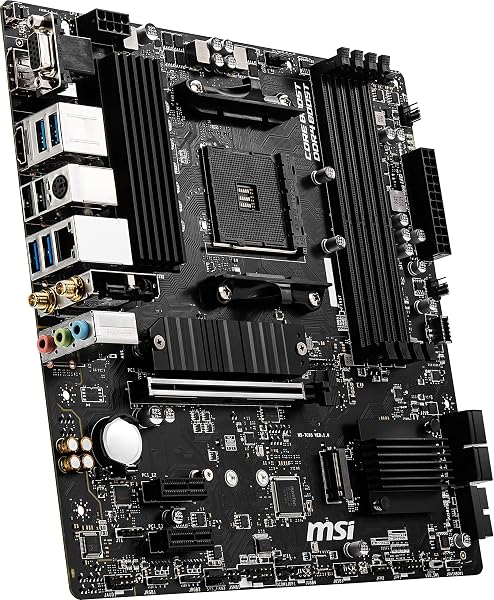
When building a PC, the motherboard is the central nervous system, and for many, the MSI B550M PRO-VDH WIFI represents an attractive entry point into the AMD AM4 ecosystem. Our team analysed its proposition, finding it to be a feature-rich Micro-ATX board that punches above its weight class in terms of connectivity and core specifications for its price tier. It supports the popular AMD Ryzen 5000 series processors, offers the crucial PCIe 4.0 support for a future-proofed graphics card, and boasts dual M.2 slots – one Gen4 and one Gen3 – a rarity at this budget level. Features like Core Boost technology and an enhanced thermal solution suggest MSI has put thought into stable power delivery and cooling, which are vital for processor longevity and performance. However, our research, drawing heavily from user forums and reviews, reveals a significant dichotomy. While the specifications list Wi-Fi 6 and promise a premium experience, a considerable number of buyers have reported the integrated Wi-Fi card to be exceptionally problematic. Speeds often cap out far below what a laptop or dedicated adapter would achieve, with users citing speeds around 30Mbps when their network can deliver 250Mbps. Bluetooth connectivity is similarly plagued with issues, leading to intermittent device disconnections. This is a major point of contention, as integrated wireless is often a key reason for selecting a board like this, especially for smaller builds where adding a separate card might be more challenging.

Beyond wireless woes, the onboard audio solution has also drawn criticism, with reports of it failing suddenly. This means users might find themselves needing a separate sound card or USB DAC sooner than expected. We've also noted recurring complaints about boot failures. The 'CPU ezdebug' light is frequently mentioned as staying on, preventing the system from POSTing, sometimes even with compatible CPUs like the Ryzen 7 5700X, or when using mixed RAM configurations. While the Flash BIOS Button is intended to simplify updates, some users have found this feature itself to be problematic. This points to potential firmware or hardware integration issues that can turn a straightforward build into a troubleshooting marathon. Compared to rivals, the Gigabyte B550M DS3H AC R2 WIFI is often cited, with some users finding the MSI to be better built overall, though the Gigabyte might feature a superior Ethernet LAN chip. The newer MSI Pro B550M-VC WiFi is a tempting step up, offering improved Wi-Fi, Bluetooth, and diagnostic LEDs. For those considering a more premium, albeit pricier, option, the ASUS Prime B550M-A (WiFi) offers similar features with a slightly more refined BIOS experience. For users focused purely on value and willing to potentially invest in a separate Wi-Fi/Bluetooth adapter, this MSI board offers a lot of silicon for the money. Building a reliable system often involves pairing components carefully; for instance, a quality PSU like the MSI MAG A750GL PCIE5 Power Supply Unit is crucial for stable power delivery, which can help mitigate some motherboard-related boot issues. Ultimately, the MSI B550M PRO-VDH WIFI positions itself as a budget-friendly motherboard that provides a strong core feature set. It's a board that, on paper, offers exceptional value. However, the prevalence of user-reported issues with its integrated Wi-Fi, Bluetooth, and audio, alongside occasional boot problems, means it's not a straightforward recommendation for everyone. Buyers must carefully weigh the significant savings and core features against the potential for hardware-related headaches. If integrated wireless is a must-have and you expect flawless performance, you might find yourself disappointed. But for users who prioritise core connectivity (PCIe 4.0, M.2 slots) and are prepared to use their own Wi-Fi adapter, it could still represent a smart buy.