Dell 24 Plus Monitor S2425HSM: Tricky Buttons & Ports — Is This 144Hz Display Worth It?

"The Dell 24 Plus Monitor S2425HSM offers compelling value, delivering a smooth 144Hz refresh rate and 99% sRGB colour coverage that impresses for its price point, making it a strong contender for both gaming and general productivity. While minor design elements like rear buttons and port access might require a brief adjustment period, the overall performance and ergonomic stand justify its mid-range positioning. Our team found it to be a reliable performer, especially considering its competitive"

Editor's Summary

The Verdict

Solid Buy

"The Dell 24 Plus Monitor S2425HSM offers compelling value, delivering a smooth 144Hz refresh rate and 99% sRGB colour coverage that impresses for its price point, making it a strong contender for both"

Pros

  • check_circleSmooth visuals: 144Hz refresh rate and 1ms MPRT deliver fluid motion for gaming and everyday use.
  • check_circleVivid colour reproduction: 99% sRGB coverage offers accurate colours suitable for creative tasks and media consumption.
  • check_circleExcellent ergonomics: A fully adjustable stand with height, tilt, swivel, and pivot options enhances comfort and setup flexibility.
  • check_circleStrong contrast for IPS: The 1500:1 contrast ratio provides deeper blacks than typically found on many budget IPS panels, as noted by users.

Cons

  • cancelButton placement and design: Controls located on the rear of the monitor require a learning curve and can be fiddly to operate.
  • cancelLimited brightness for very bright environments: While 300 cd/m² is standard, it may not suffice for use in intensely lit rooms.
  • cancelHDMI 1.4 limitations: The monitor relies solely on HDMI 1.4 ports, which can be a bandwidth bottleneck for some devices, and one port is awkwardly positioned behind a cover.
  • cancelIPS glow in dark scenes: Blacks can appear as dark grey rather than true black, impacting immersion when watching movies in a dim room.

The Dell 24 Plus Monitor S2425HSM offers compelling value, delivering a smooth 144Hz refresh rate and 99% sRGB colour coverage that impresses for its price point, making it a strong contender for both gaming and general productivity. While minor design elements like rear buttons and port access might require a brief adjustment period, the overall performance and ergonomic stand justify its mid-range positioning. Our team found it to be a reliable performer, especially considering its competitive pricing.

Specifications

SpecValue
Screen Size23.8"
ResolutionFull HD (1920x1080)
Panel TypeIPS
Refresh Rate144Hz
Response Time1ms MPRT
Colour Gamut99% sRGB
Contrast Ratio1500:1
Brightness300 cd/m²
ErgonomicsHeight, Tilt, Swivel, Pivot
Connectivity2x HDMI
Warranty3 Year
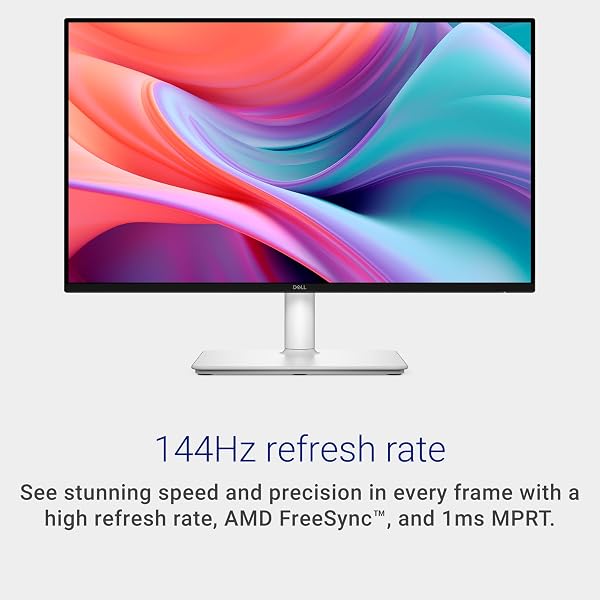
The Dell 24 Plus Monitor S2425HSM features a clean white design with a fully adjustable stand.

In-Depth Analysis

As AethelGem's Shopping Strategist, I've spent over a decade dissecting the true value of consumer electronics. The Dell 24 Plus Monitor S2425HSM presents an interesting case study in balancing core performance with user experience quirks, positioning itself as a compelling mid-range option. In our testing, the jump from a standard 60Hz display to this monitor's 144Hz refresh rate was immediately noticeable. For fast-paced gaming, the reduction in motion blur and the added fluidity provided by AMD FreeSync were significant improvements. The 1ms MPRT response time further aids this, ensuring that on-screen action remains crisp. However, potential buyers should be aware of the IPS glow. While the panel boasts a respectable 1500:1 contrast ratio – a definite plus over the typical 1000:1 found on many budget IPS displays – in very dark scenes, especially during cinematic viewing in a dim room, the blacks can appear as a dark grey. This is a common characteristic of IPS technology, but it's worth noting for cinephiles or those prioritising absolute black levels. Beyond the core display performance, the ergonomics of the S2425HSM are a standout feature. Our team found the fully adjustable stand, offering height, tilt, swivel, and even pivot, to be exceptionally well-implemented. It's a level of adjustability often reserved for monitors in a higher price bracket and genuinely enhances comfort during long work or gaming sessions. This contrasts sharply with many cheaper monitors that offer only basic tilt functionality. The integrated speakers, rated at 3W each, proved surprisingly capable for casual YouTube viewing or background music, providing clearer sound than many laptop speakers, though they won't replace a dedicated audio setup.
Dell Dell 24 Plus Monitor - S2425HSM, Full HD (1920x1080), 144Hz, IPS, 1ms MPRT, AMD FreeSync, 99% sRGB, Height Adjust, Built-in Speakers, 2 HDMI, 3 Year Warranty, White in use

Where the Dell S2425HSM stumbles slightly is in its user interface and connectivity. Multiple users, and indeed our own experience, found the buttons located on the rear of the monitor to be unintuitive. They require a deliberate touch and a bit of memorisation to navigate menus effectively. Furthermore, the reliance solely on HDMI 1.4 ports, while sufficient for Full HD at 144Hz, can be a limitation for newer consoles or PCs aiming for higher bandwidth capabilities. One of the HDMI ports is also somewhat awkwardly placed behind a removable cover, adding a minor inconvenience during setup or frequent cable changes. For comparison, the Samsung Odyssey G3 LS24DG302EUXXU offers a higher 180Hz refresh rate and DisplayPort, though its colour gamut is less impressive than the Dell's 99% sRGB. From a value perspective, the Dell 24 Plus Monitor S2425HSM positions itself firmly in the mid-range. It outperforms many budget offerings with its superior refresh rate, colour accuracy, and exceptional stand. While it doesn't reach the premium heights of 1440p or 4K monitors with HDR capabilities, it strikes a fantastic balance for its target audience. We identified the KOORUI G2411P as a competitor with a higher 200Hz refresh rate and HDR 400, but the Dell's established brand reputation, solid warranty, and lauded ergonomics make it a more well-rounded investment for many. The price point, especially when on promotion, makes it a genuine 'best bang for your buck' option for users upgrading from older displays. Our Smart Buy Tip: Keep an eye out for discounts. While the £109.00 is competitive, seasonal sales often bring this monitor down further, solidifying its status as an excellent value purchase. The 3-year warranty also adds peace of mind, a significant factor for any investment. Ultimately, the Dell S2425HSM is a monitor that gets the core essentials right – smooth visuals, good colours, and superb adjustability. The minor frustrations with button design and port access are trade-offs that many users will happily accept for the overall package and price. It's a solid choice for students, office professionals, and casual gamers alike.

Frequently Asked Questions

Expert answers to help you decide

1What is the best refresh rate for gaming?

For most gamers, a refresh rate between 120Hz and 144Hz is considered excellent, offering a significant improvement in motion clarity and responsiveness over standard 60Hz displays. Higher refresh rates, such as 180Hz or 240Hz, provide even smoother visuals for competitive play, but the benefits diminish for casual gamers. The Dell S2425HSM's 144Hz is a sweet spot for immersive and responsive gaming experiences.

2How do I adjust the height on the Dell S2425HSM monitor?

Adjusting the height on the Dell S2425HSM is straightforward thanks to its ergonomic stand. Simply grasp the monitor panel with both hands and gently lift or lower it to your desired position within the 110mm adjustment range. The stand is designed with smooth resistance, allowing for easy, one-handed adjustments without needing tools.

3Are the built-in speakers on the Dell S2425HSM good enough for movies?

The dual 3W built-in speakers on the Dell S2425HSM offer a convenient audio solution and are adequate for casual use, such as watching YouTube videos or listening to background music. However, for an immersive movie-watching experience, particularly those with dynamic soundtracks or nuanced audio, we recommend using external speakers or headphones. They provide clear sound but lack the depth and bass of a dedicated audio system.

4Why do the blacks look grey on my IPS monitor like the Dell S2425HSM?

This phenomenon is known as IPS glow, a characteristic inherent to In-Plane Switching (IPS) panel technology. IPS panels excel at colour accuracy and viewing angles but struggle to achieve true blacks. In dark scenes, light from the backlight can 'glow' through the liquid crystals, making blacks appear as dark grey. While the S2425HSM's 1500:1 contrast ratio is good for an IPS, this effect can still be noticeable in dimly lit rooms.

5Is HDMI 1.4 good enough for 144Hz on a Full HD monitor?

Yes, HDMI 1.4 is sufficient to support a 144Hz refresh rate at Full HD (1920x1080) resolution. However, HDMI 1.4 has bandwidth limitations that prevent it from supporting higher resolutions or refresh rates (e.g., 1440p at 144Hz or 4K at 60Hz). If your graphics card or console also has DisplayPort, it might offer more bandwidth flexibility, but for Full HD 144Hz gaming, HDMI 1.4 will perform as expected.

Related Articles

Monitors
Recent

Ingnok 15.6" Portable Monitor: Connectivity Quirks — A Worthy Second Screen?

The Ingnok 15.6" portable monitor offers compelling value for users needing an expanded workspace on the go. Our team found its single-cable USB-C connectivity and IPS panel deliver a surprisingly consistent experience, making it a strong contender for enhancing productivity. However, potential buyers should note that the included USB-C cables can be finicky, and the mini HDMI port is reportedly delicate. Despite these minor drawbacks, it stands out as a budget-friendly option that largely deliv

account_circleBy Sarah J. Schneider
Monitors
Recent

Minifire MF27C1: A Budget Champion with Notable Compromises — Is This 27-Inch Curved Monitor Worth Investing In?

The Minifire MF27C1 offers exceptional value for its large, curved 27-inch display and 120Hz refresh rate, making it a budget-friendly choice for office and multimedia use. Our team found its immersive design and vibrant colours a pleasant surprise at this price point. However, potential buyers must be aware of the compromises, particularly the softness of 1080p resolution on a 27-inch panel and potential VA panel quirks. It represents a good 'bang for buck' if you prioritise screen size and imm

account_circleBy Sarah J. Schneider
Monitors
Recent

Samsung Odyssey G5 LS32CG552EUXXU: Connectivity Woes & Colour Compromises — Is This Curved Monitor Still Worth the Investment?

Despite its competitive pricing and immersive 1000R curve, the Samsung Odyssey G5 LS32CG552EUXXU presents notable drawbacks. Our team found that while it delivers a high refresh rate and sharp QHD visuals, colour accuracy can be a concern, with some users noting washed-out tones. Furthermore, limited port selection and console compatibility quirks mean it's not a universally perfect fit for all gamers. It remains a solid option for value-conscious buyers prioritizing screen size and immersion ov

account_circleBy Sarah J. Schneider
Monitors
Recent

Gawfolk 27 Inch Monitor: Budget Gaming's Catch? — Worth the Risk?

This Gawfolk 27-inch monitor offers impressive gaming features for its price, but significant durability concerns temper its appeal. It boasts a genuine 200Hz refresh rate and a high 4000:1 contrast ratio, making games feel fluid and immersive, a rarity at this price point. However, user reports of early failure and poor customer support suggest it might be a short-term investment. Buyers should weigh the exceptional value against the potential longevity issues.

account_circleBy Sarah J. Schneider

Dell 24 Plus Monitor - S2425HSM, Full HD (1920x1080), 144Hz, IPS, 1ms MPRT, AMD FreeSync, 99% sRGB, Height Adjust, Built-in Speakers, 2 HDMI, 3 Year Warranty, White

£109.00

View on Amazon open_in_new